These four indicators determine which colleague your customer wants to speak with
In this article, we discuss the four most important indicators that help predict which colleague will answer your customer’s next call.


After analyzing 16,192 calls, it became clear fairly quickly that the colleague the caller spoke with most recently is likely the one the caller will want to speak with again next time. But we were able to learn much more from that research, as it turned out that other parameters were relevant as well.
In this article, we’ll discuss the four most important indicators that help predict which colleague will answer your customer’s next call. We’ll also explain how our system works to identify the right colleague and how you can build a similar system yourself.
Has the caller spoken to someone recently?
As mentioned in the previous article, “the colleague they last spoke with” is by far the strongest parameter and the best predictor of who will handle the next call. In fact, out of 1,272 routed and handled incoming calls, we found that 325 of them were followed by a previous call within the preceding four hours. In 75% of those cases, the same colleague answered the phone again. Within thirty days, that figure was 61% out of 628 calls.
It becomes even more interesting, by the way, if you can also link other forms of communication to the system, such as email or WhatsApp conversations. After all, it often happens that someone calls in response to an email, or that WhatsApp turns out not to be the right channel, and a phone call gets you to a solution faster. If you have that data, use it.
At Voys, we now use email in our routing process, right after the phone signal. For calls where the phone rule doesn’t yield a result, an outgoing email no more than three days old identifies the right colleague in 77% of cases.
Which number does the customer call?
The number someone dials says something about their intent. Someone who calls the support number probably needs help with something. Someone who calls the billing number probably has a question about an invoice. That may seem trivial, but it’s exactly where smart routing often goes wrong.
Because suppose this: last week, that customer spoke with your account manager about expanding the services they’ve purchased. Then the first parameter, “the most recent conversation”, cheerfully says: just transfer the call to sales. But the customer is now calling the administrative number, and account managers often know suspiciously little about invoices.
The solution to this is relatively simple: if the colleague who last spoke with the caller isn’t in the group associated with the dialed number, we don’t transfer the call to that colleague. In that case, we also don’t look for a replacement. The system simply doesn’t return a specific recipient, and the Freedom platform handles the call using the call group that follows our initial lookup.
That list of colleagues we select per number isn’t part of the standard Voys calling plan, but is instead in a separate system we developed outside of Freedom specifically for this call routing, more on that later. The call group containing the colleagues who will then receive the call is, however, part of Freedom.
Thus, “last spoken to” and “called number” are two parameters that correct each other. One indicates who the customer knows, while the other provides a clue as to why the customer is calling.
What’s in your CRM system?
The CRM system parameter is intentionally listed at the bottom, but not because CRM data is worthless. In the first part of this series, you saw the pattern: the owner of an open deal is our most accurate signal, but an open deal can only be found in the CRM for 5% of calls. The contact and company owner are known much more often, but they are less effective predictors for us, with an accuracy of 42%. This may be different for your company. And the better you maintain those fields in your CRM system, the higher this parameter should be ranked for you.
Our routing order
Our current routing order is:
- The colleague with whom the caller last had an actual conversation.
- The colleague who sent the most recent email directly linked to the contact in the CRM, no more than three days old.
- The owner of the most recently updated open deal or the most recently updated open ticket in the CRM, within the last three months.
- The owner of the contact or company in the CRM.
- The owner of the most recently updated closed deal or the most recently updated closed ticket in the CRM, within the last three months.
If none of these five criteria identifies a colleague who falls within the scope of the dialed number and is available at that moment, we do not return a destination, and Freedom handles the call with the colleagues in the aforementioned call group.
If multiple recent open deals or tickets result in different colleagues, the system selects the owner of the most recently updated activity. If the ultimately selected CRM owner cannot be unambiguously linked to a single internal colleague, we select no one. You cannot resolve an ambiguous link by randomly selecting someone.
The same applies to the step before that. Does the caller’s phone number match multiple contacts in the CRM? If so, the process stops there: we do not select a contact, and therefore no owner. This is not an edge case. It involves 367 of our 6,359 unique external numbers, often general business numbers shared by multiple people.
Is that colleague actually available right now?
Then the most important question: Is the colleague predicted by the parameters actually available? If you add a colleague or a call group of colleagues to a regular calling plan in Freedom, the platform itself can take availability into account within that calling plan.
If you return the internal number of an individual colleague via our webhook, our own system first checks that colleague’s current Voys presence status. We only return that internal number if the colleague is explicitly available for external calls. If the colleague is unavailable, this routing rule does not return a destination, and Freedom can proceed via the other branch of the calling plan.
This way, we only return a personal destination when the colleague actually appears to be available at the moment the decision is made. Within standard call groups, you can largely handle this in Freedom with a well-configured calling plan. As soon as an external system begins selecting individual destinations, that system must also carefully manage current availability.
Let the customer know what’s happening with the call
Another thing we do as soon as we see that a customer we’ve spoken with before is calling is to let them know they’ll be transferred to the colleague they last spoke with. This is important because customers who call appreciate knowing what’s happening with their call and why.
A recognized customer follows a different process than an unrecognized customer.
If that colleague turns out to be unavailable, you can inform the customer that we’re looking for another colleague with similar expertise—for example, through a call group with colleagues who have the same expertise. Again, be sure to let the customer know.
Show who’s calling
It’s also a good idea to display on your colleague’s screen who’s calling, the contact person, the company, or ideally both.
The webhook response (the technical term for the information our system sends back to Freedom) includes, if that information is available, the colleague’s internal extension, the caller’s name, and the company name as listed in our CRM system. This means whoever answers the call can immediately see who’s calling.
The nice thing is that the name is often enough to remind you of the context of the last conversation. If you’re feeling brave, you can even answer with, “Hi Inge, you had a question?”
How long do you let the phone ring?
This raises the question of how to ensure that the caller gets someone on the line as quickly as possible, even if the selected colleague turns out to be unavailable.
An initial analysis of our own calls shows that 90% of calls are answered within 13 seconds by that selected colleague. Letting the phone ring any longer yields almost no benefit, so those 13 seconds are the right time to switch in the call plan to the fallback call group of people with similar expertise who can also handle the customer’s inquiry if necessary.
What the caller hears in the meantime
This raises the question of how long a caller will wait before hanging up. Older research sets that threshold at around 18 seconds, about four to five rings, before people hang up. I can tell you right now that this figure can be more than double that. However, it’s not just about how long a caller is willing to wait before someone answers. It’s also about how quickly you can answer and how the caller perceives the wait.
Waiting time actually feels shorter when callers hear something relevant. Research on the perception of waiting time shows that appropriate audio can shorten the perceived waiting time by about a third, while silence actually stretches it by more than a third.
In addition, the customer knows what happens to a call and why. That’s also something people find reassuring.
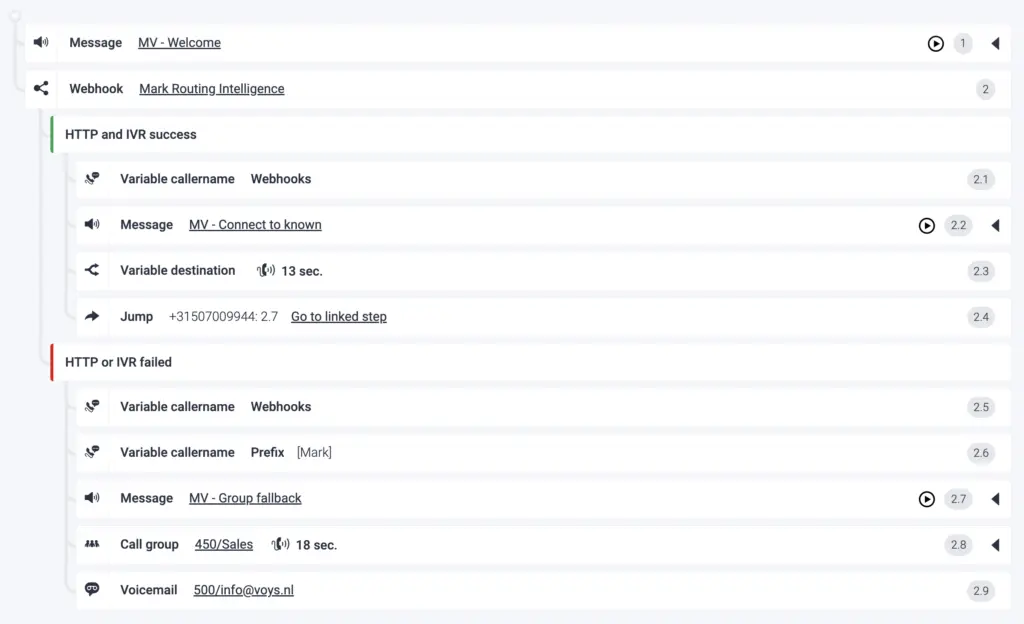
The call plan with our Routing Intelligence system.
This is a custom solution, and that’s no longer a problem
Now the big question is why I built a custom system for this. Here’s why: Freedom can do a lot, but in our situation, the platform can’t automatically combine CRM data, call history, team assignments, and real-time availability on its own. Also, the detailed analysis I was able to run on our call details isn’t possible in Freedom in this form.
That’s why we’ve made it possible to export data, why we have the notification system, and why Freedom is equipped with a webhook. This way, your telephony environment can grow alongside your organization, even as your company expands and your telecom needs become more complex. You can also use those notifications to build your own metrics and dashboards, as my colleague Sanne wrote about earlier.
As this article clearly shows, there’s a tremendous amount you can do in Freedom without having to write a lot of custom code. And thanks to AI, writing custom code has become much simpler. So I’m especially curious to see how you’ll set up Freedom and what you’ll build after reading this article.